

TL;DR:
- Scaling custom print production involves increasing output through automation, standardized workflows, and effective pricing strategies. It requires proper tools, file standards, and capacity planning before expanding to avoid bottlenecks and delays. Most growth occurs when owners optimize operations and delegate tasks rather than simply buying more equipment.
Scaling custom print production is defined as the process of increasing output capacity without proportionally increasing labor or costs. The global print-on-demand market is projected to grow from $6.18 billion in 2022 to $38.21 billion by 2030, a compound annual growth rate of 25.8%. That number signals one clear reality: the window for capturing market share in custom apparel is wide open right now. Businesses that build automated, structured operations today will own that growth. Those still running manual workflows will watch it pass them by.
How to scale custom print production: what you need first
Scaling without a foundation is how businesses stall at $5,000 a month and stay there. Before adding volume, you need the right tools, file standards, and capacity planning in place.

File standards that prevent costly delays
Print-ready files require 300 DPI or higher resolution, CMYK color space, and correct bleed settings. Submitting files that fall short of these standards causes reprints, delays, and wasted material at scale. One bad file in a 200-piece run costs far more than the time it takes to set a file submission policy upfront.
Pro Tip: Build a file submission checklist and send it to every customer before they upload artwork. A one-page PDF with resolution, color mode, and bleed requirements cuts file rejection rates dramatically.
Tools and technology you need before scaling
The right technology stack removes the manual bottlenecks that cap your growth. Automating file handling by routing print-ready files to cloud storage is one of the fastest ways to break through revenue ceilings. Pair that with order management software that handles quoting, job tracking, and customer communication automatically.
Here is the core technology stack every custom print operation needs before scaling:
- Cloud storage (Google Drive, Dropbox, or similar) for organized, accessible file management
- Order management software to automate quoting and reduce manual data entry
- Preflight tools like Adobe Acrobat Pro to catch file errors before they reach the press
- Production scheduling software to sequence jobs and balance equipment load
- Webhook automation to trigger file routing and status updates without human input
| Tool Category | Purpose | Scaling Benefit |
|---|---|---|
| Cloud storage | Centralized file access | Eliminates lost files and version errors |
| Order management software | Automates quoting and tracking | Removes manual bottlenecks |
| Preflight software | Checks files before printing | Reduces reprints and waste |
| Production scheduling | Sequences jobs by equipment | Balances load and prevents downtime |
| Webhook automation | Triggers file routing automatically | Cuts human touchpoints per order |
Equipment capacity planning matters just as much as software. A common mistake is adding presses without adding dryer capacity to match. Your dryer throughput sets the ceiling for your entire production floor.
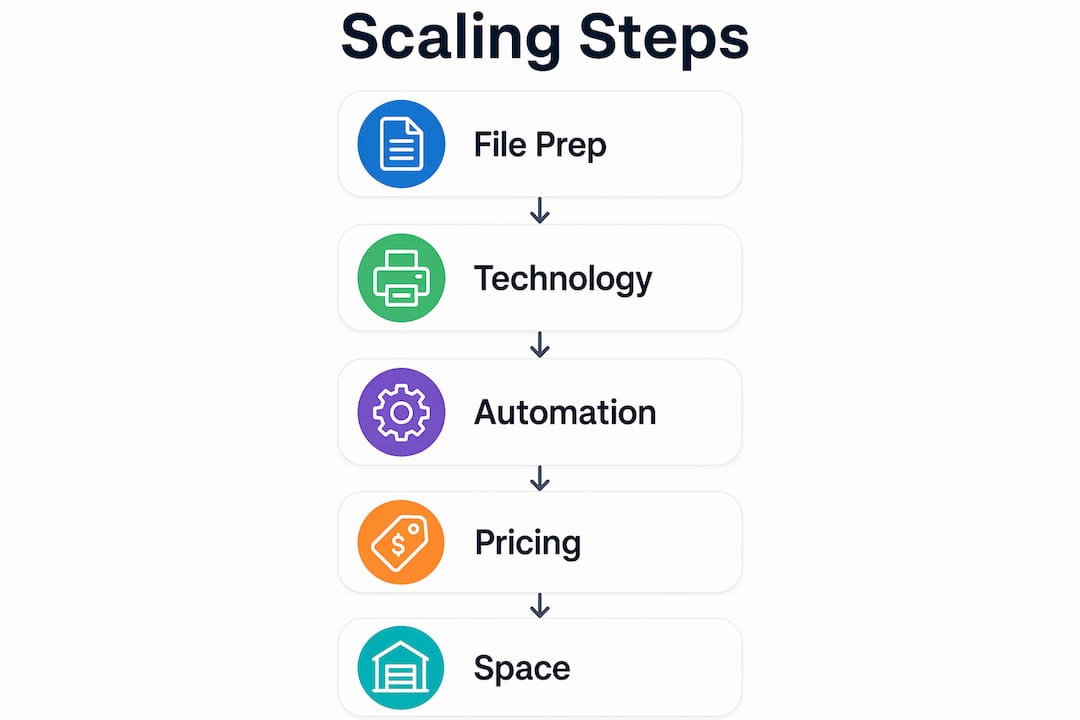
How do you automate your workflow to increase print volume?
The most effective production structure for scaling is what industry practitioners call the two-lane highway. Separating production into standard automated jobs and custom manual jobs improves both throughput and profit margins. Standard jobs move fast through automated routing. Custom jobs get the human attention they need without slowing down the rest of the floor.
Building the two-lane production system
Standard lane jobs share common specs: fixed sizes, approved color profiles, and repeat artwork. These jobs move from order intake to press with minimal human involvement. Custom lane jobs require design review, color matching, and client approval before production begins. Keeping these two streams separate prevents custom complexity from choking your high-volume output.
Color calibration is a margin strategy, not a luxury. Standardized color profiles and finishing recipes mean every run matches the approved proof. Inconsistent color on large orders triggers reprints that destroy the profit on a job.
Pro Tip: Schedule finishing tasks like folding, bagging, and labeling at the start of each production day, not the end. Finishing bottlenecks are the most common reason orders ship late even when printing finishes on time.
Workflow automation features that matter most
Automating quoting, order intake, job tracking, and customer communication is the difference between a business that grows and one that grinds. Each manual touchpoint is a chance for error and a drain on your time. The goal is to reduce the number of decisions a human must make per order.
Key workflow automation features to build into your operation:
- Automatic file routing based on job type and specs
- Triggered customer notifications at each production stage
- Digital job tickets that update in real time
- Automated reorder prompts for repeat customers
- Preflight checks that flag file issues before they reach the queue
For a detailed look at how these steps connect, the DTF print workflow guide from Transferkingz breaks down the full production sequence for custom apparel operations.
What pricing strategies support a scalable print business?
Pricing is where most custom print businesses quietly lose money. The fix starts with calculating your true break-even point, which means distributing fixed overhead costs across every unit you produce. Rent, equipment payments, software subscriptions, and insurance all belong in that number. Pricing based on material costs alone guarantees you will undercharge as volume grows.
Tiered pricing that drives volume
Tiered pricing structures that incentivize larger orders protect your margins and train customers to order more. A 12-piece minimum at one rate and a meaningfully lower rate at 72 pieces or more gives customers a financial reason to consolidate orders. That consolidation reduces your setup time per unit and improves your effective hourly rate.
Numbered best practices for pricing and operational discipline:
- Calculate your full cost per unit including fixed overhead before setting any price
- Build tiered pricing with clear volume breaks (12 pieces, 36 pieces, 72 pieces)
- Set a minimum order value that covers your setup time regardless of quantity
- Review your pricing every quarter as equipment costs and material prices shift
- Charge rush fees that reflect the actual operational cost of expedited production
Pro Tip: Never set your rush fee as a flat dollar amount. Calculate it as a percentage of the order total so it scales with the complexity and size of the job.
When to commit to commercial space
Committing to commercial space after a single sales spike is one of the most common and costly mistakes in this industry. Steady, proven volume over at least three consecutive months is the right trigger for that decision. A reliable benchmark is maintaining 500 pieces per week consistently before signing a lease. Overhead that arrives before revenue is ready will compress your margins at exactly the wrong time.
Scaling also requires delegation. The owner who touches every order is the ceiling of the business. Outsourcing finishing tasks, customer service, or file prep to trained staff or external partners frees your attention for production decisions that actually move the needle.
What common mistakes block scaling in custom print production?
The fastest way to stall a growing print operation is to treat peak demand as your new normal. One strong holiday season does not justify doubling your equipment or staff. Capacity decisions need to reflect your average weekly volume, not your best week.
“Scaling requires operational maturity, replacing daily founder involvement with automated, centralized software to decouple growth from personal workload.”
File problems are the most common production failure at scale. Applying preflight checks proactively using tools like Adobe Acrobat Pro dramatically reduces delays and material waste. A file that looks fine on screen can print with banding, color shifts, or missing bleeds if it was never properly checked.
Mitigation strategies for the most common scaling blockers:
- Set mandatory file standards and enforce them before accepting an order
- Use professional proofing with hard proofs for large runs to catch color issues before full production
- Replace manual quoting with software that generates quotes from a fixed pricing matrix
- Limit customization options to a defined menu of sizes, colors, and print locations
- Track your weekly unit volume for at least three months before making infrastructure commitments
Limiting customization options in favor of modular design components improves production predictability and speed. Infinite customization sounds like a competitive advantage. In practice, it creates quoting complexity, file inconsistency, and production delays that shrink your margins on every order.
For a complete look at how file preparation connects to production efficiency, the workflow optimization checklist from Transferkingz covers every step from artwork submission to finished goods.
Key takeaways
Scaling custom print production requires automation, structured workflows, and pricing discipline applied together, not in isolation.
| Point | Details |
|---|---|
| File standards come first | Require 300 DPI, CMYK, and correct bleeds before any order enters production. |
| Automate before you add volume | Route files, quotes, and job tracking through software to remove manual bottlenecks. |
| Use a two-lane workflow | Separate standard automated jobs from custom manual jobs to protect throughput and margins. |
| Price for full overhead | Include fixed costs per unit and use tiered pricing to reward larger orders. |
| Prove volume before expanding | Maintain consistent weekly output for at least three months before committing to new space or equipment. |
The uncomfortable truth about scaling print operations
Most print business owners I talk to think scaling means buying more equipment. That instinct is almost always wrong. The businesses that grow fastest are the ones that fix their operations before they add capacity. More presses running a broken workflow just produce more chaos faster.
The shift that actually changes things is treating your operation like a system rather than a collection of tasks. When I look at print shops that have crossed $20,000 a month in revenue, the common thread is not the equipment they run. It is that the owner stopped being the bottleneck. Automated file routing, standardized pricing, and clear production lanes meant the business could take on more orders without the owner working more hours.
Burnout is a real scaling risk that almost nobody talks about. Growing from 200 pieces a week to 800 pieces a week while still personally approving every proof and answering every customer email is not growth. It is a faster path to exhaustion. Delegation is not a sign of losing control. It is the mechanism that makes control possible at higher volume.
The operational maturity piece matters more than any single tool or technique. When your business can run a full production day without you making every decision, you have built something that can actually scale. That is the goal worth working toward.
— Anthony
Transferkingz: a production partner built for scale
Custom apparel businesses that are ready to grow need a transfer supplier that keeps pace with their volume demands.

Transferkingz specializes in high-quality Direct-to-Film (DTF) transfers that handle intricate, detailed artwork without sacrificing color accuracy or durability. Whether you are running a 12-piece order or a 500-piece production week, DTF transfer films from Transferkingz deliver consistent results that protect your reputation with every customer. The Print Point resource hub gives you expert guidance on production workflows, file preparation, and scaling strategies built specifically for custom apparel operations. No minimums, fast turnaround, and premium materials mean your production schedule stays on track even as your order volume climbs.
FAQ
What does scaling custom print production actually mean?
Scaling custom print production means increasing your output capacity without a proportional increase in labor or operating costs. The goal is to produce more units per hour or per week by improving workflows, automating repetitive tasks, and structuring operations efficiently.
What file specs are required for large print runs?
Print-ready files need 300 DPI or higher resolution, CMYK color space, and correct bleed settings. Files that miss these standards cause reprints and production delays that compound quickly at high volume.
When should I commit to a commercial print space?
Commit to commercial space only after maintaining consistent production volume for at least three consecutive months. A common benchmark is 500 pieces per week sustained over that period before signing a lease.
How does tiered pricing help grow a print business?
Tiered pricing gives customers a financial incentive to place larger orders, which reduces your setup time per unit and improves your effective hourly rate. Setting clear volume breaks at 12, 36, and 72 pieces is a proven structure for encouraging order consolidation.
What is the two-lane workflow in print production?
The two-lane workflow separates standard automated jobs from custom manual jobs on the production floor. Standard jobs move through automated routing with minimal human involvement, while custom jobs receive dedicated review and approval steps without slowing down high-volume output.
0 comments