

TL;DR:
- Scaling custom printing involves improving workflows through automation and standardization to grow revenue without proportional cost increases. Key steps include enforcing file standards, automating order processing, balancing capacity, and documenting processes to avoid bottlenecks. Proper measurement and disciplined financial management are essential for sustainable growth.
Scaling custom printing is the process of growing order volume, production capacity, and revenue without proportionally increasing labor or overhead costs. The print-on-demand market reached $14.8 billion in 2026, a 340% year-over-year increase driven by demand for personalized merchandise. That number signals one thing clearly: the window to grow a custom print business is wide open right now. But the shops that actually capture that growth are not the ones buying the fastest equipment. They are the ones building the tightest workflows. This guide covers exactly how to scale custom printing through automation, file standardization, capacity planning, and financial discipline.
How to scale custom printing: tools and prerequisites
The right foundation determines whether your growth holds or collapses under its own weight. Before you add orders, you need the right software, hardware, and file standards in place.
Software and hardware you need first
The essential tools for scaling fall into three categories: order management, file handling, and production control. Order management platforms like Printavo or ShopVox centralize job tracking and prevent orders from falling through the cracks. Cloud file storage solutions like Google Drive or Dropbox Business give your team consistent access to approved artwork without version confusion. Automated proofing software removes the back-and-forth that kills turnaround times.

Here is a quick comparison of the core tool categories and what each one does for your operation:
| Tool Category | Example Tools | Primary Role |
|---|---|---|
| Order Management | Printavo, ShopVox | Centralize job tracking and customer communication |
| Cloud File Storage | Google Drive, Dropbox Business | Store and version-control approved artwork |
| Automated Proofing | Artwork Approval Software | Reduce manual review cycles and speed approvals |
| Email Automation | Klaviyo | Trigger personalized order updates via webhooks |
| Workflow Automation | Zapier, Make | Connect platforms and remove manual data entry |
File preparation standards you cannot skip
File standardization is mandatory to avoid production delays caused by manual file fixes. Every file submission must meet minimum DPI requirements (300 DPI for most print applications), use the correct color profile (CMYK for most presses, sRGB for DTF), and include proper bleed zones. Treating these requirements as a technical barrier rather than a customer convenience actually improves throughput. When customers submit print-ready files, your team stops spending hours on corrections and starts spending that time on production.
Pro Tip: Build a file submission checklist into your order form using a tool like JotForm or Typeform. Customers who miss a requirement get an automatic rejection with instructions, not a manual email from you.
What are the best step-by-step scaling strategies?
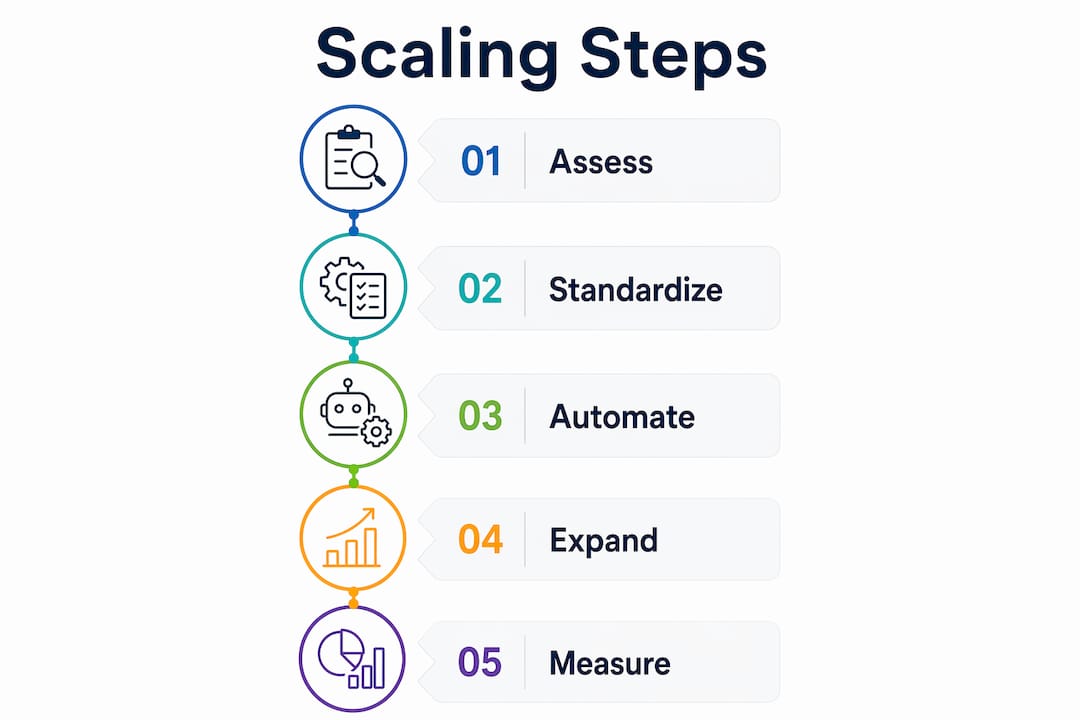
Knowing the tools is one thing. Executing a repeatable growth plan is another. These steps move you from reactive production to a system that scales without you touching every order.
-
Standardize file submissions. Lock down your upload requirements and enforce them at the point of order. Customers who cannot submit a compliant file do not move forward until they do. This single change eliminates the most common source of production delays.
-
Automate order intake and routing. Connect your storefront (Shopify, WooCommerce, or Etsy) to your order management platform using Zapier or Make. Orders flow directly into your production queue without manual data entry. This is where workflow automation pays for itself within weeks.
-
Set up proofing automation. Use automated proofing software to send digital proofs to customers the moment an order is accepted. Approval triggers the next production step automatically. No human needs to monitor the queue for a green light.
-
Balance printing and curing capacity. Curing capacity must be at least 150% of your printing capacity to prevent finishing bottlenecks during peak periods. If your press can output 200 shirts per hour, your dryer needs to handle at least 300. Ignoring this ratio is the most common reason shops hit a ceiling during busy seasons.
-
Diversify your product offerings. Adding custom apparel to a home decor catalog raised daily orders by over 40% within weeks in documented cases, while improving conversion rates by up to 12%. Bundles and product combinations increase average order value without adding new customers.
-
Trigger personalized customer communication. Automated emails via webhooks increase customer engagement by 8–12% compared to default transactional notifications. Klaviyo integrates directly with most POD and print management platforms to handle this automatically.
Pro Tip: Do not automate everything at once. Pick one bottleneck, automate it fully, then move to the next. Shops that try to overhaul their entire workflow in one sprint usually stall halfway through and end up with a broken hybrid system.
What are common challenges when scaling a print shop?
Every shop hits the same walls during growth. Knowing what they are before you hit them is the difference between a temporary slowdown and a full operational breakdown.
The most frequent scaling mistakes and how to fix them:
-
Manual file touching. When your team corrects customer files instead of rejecting them, you create an invisible labor cost that grows with every new order. Fix this by enforcing strict upload standards from day one.
-
Equipment capacity mismatches. A dryer-press ratio below 1:1 creates critical production delays. Audit your finishing capacity before you add a new press, not after.
-
Customer revenue concentration. Limiting any single customer to about 20% of total revenue protects your cash flow if that account pauses or leaves. Shops that let one client represent 50% or more of revenue are one relationship away from a crisis.
-
Undocumented workflows. Owners who keep key processes in their heads rather than in written SOPs create a bottleneck that is themselves. Every critical process needs a documented standard operating procedure that any trained employee can follow.
-
Ignoring payment terms. Maintaining payment terms within 10–30 days keeps cash flowing during expansion. Extended terms with large clients feel like a win until payroll is due and the check has not arrived.
Pro Tip: Audit your top five workflows this week. If you are the only person who knows how to execute any one of them, that workflow is a liability. Document it before it becomes a crisis.
The shift from a hub-and-spoke model to a system-based operation with documented SOPs is the single most important structural change a growing print shop can make. It is not glamorous, but it is what separates shops that scale from shops that plateau.
How do you measure success after scaling your print business?
Growth without measurement is just chaos at a higher volume. Define your key performance indicators before you scale, not after you are already overwhelmed.
The metrics below give you a clear picture of whether your scaling efforts are working or just creating new problems:
| Metric | What It Measures | Target |
|---|---|---|
| Order Volume Growth | Weekly and monthly order count trends | Consistent upward trend, no single-week spikes masking decline |
| Revenue Concentration | Largest single customer as % of total revenue | No single client above 20% |
| Production Throughput | Orders completed per shift | Increases with each workflow improvement |
| Rework Rate | Orders requiring manual correction or reprints | Below 3% of total orders |
| Cash Flow Cycle | Average days from order to payment received | 10–30 days |
SOPs and repeatable workflows are the engine behind consistent metrics. A shop that documents its processes can onboard new employees faster, maintain quality during busy seasons, and identify exactly where a breakdown occurred when something goes wrong. Without documentation, every problem requires the owner to diagnose it personally.
Sustainable growth also requires watching your cash position, not just your order volume. An operation processing twice as many orders but carrying 60-day receivables is not healthier. It is more exposed. Balance growth goals with the financial discipline to keep your operation solvent through every growth phase.
Key takeaways
Scaling custom printing successfully requires workflow systems, not just faster equipment or more orders.
| Point | Details |
|---|---|
| Workflow over hardware | Automate order intake, proofing, and file routing before investing in new equipment. |
| File standards are non-negotiable | Enforce DPI, color profile, and bleed requirements at submission to eliminate manual corrections. |
| Balance production capacity | Keep curing and finishing capacity at 150% of printing output to prevent peak-season bottlenecks. |
| Document every critical process | Replace owner-dependent tribal knowledge with written SOPs any employee can execute. |
| Diversify revenue and products | Cap single-client revenue at 20% and add product categories to increase orders and reduce risk. |
Why most print shops scale the wrong way
I have watched a lot of print shop owners make the same mistake. They hit a growth ceiling, decide the answer is a new press or a faster printer, spend $30,000, and end up with the exact same bottlenecks at a higher volume. The machine was never the problem.
The real constraint is almost always the workflow sitting around the equipment. Files arriving in the wrong format. Orders being routed manually. Proofs waiting on a human to send them. These are not equipment problems. They are process problems, and no amount of hardware fixes a broken process.
What I have found actually works is treating your print shop like a software company treats its codebase. Every process gets documented. Every handoff gets automated where possible. Every exception gets a rule. When you build the operation that way, adding volume is just a matter of turning up the dial. When you skip that step, every new order is another opportunity for something to go wrong.
The other thing most guides will not tell you is that growth can genuinely hurt you if your cash flow is not managed tightly. Taking on a massive client who pays on 60-day terms while your suppliers want payment in 15 days is a fast path to a cash crisis even when revenue looks great on paper. Discipline around payment terms and revenue concentration is not conservative thinking. It is what keeps you in business long enough to actually scale.
The bulk order workflow question comes up constantly from shop owners who want to grow. My answer is always the same: fix the workflow for 50 orders before you try to run 500.
— Anthony
Scale faster with Transferkingz DTF transfers
If you are ready to grow your custom print operation, your transfer supplier needs to keep pace with your volume. Transferkingz specializes in high-quality Direct-to-Film (DTF) transfers built for businesses that are actively scaling. No minimum order requirements mean you can test new products without committing to bulk inventory. Fast turnaround times and premium inks keep your production schedule tight even during peak demand.

Whether you are running a small shop in Texas or fulfilling orders nationwide, Transferkingz gives you the print quality and speed your customers expect. Explore custom DTF printing services built for businesses that are serious about growth. For shops across the state, Transferkingz also offers DTF printing across Texas with the same fast turnaround and no minimums.
FAQ
What does scaling custom printing actually mean?
Scaling custom printing means growing order volume and revenue without a proportional increase in labor or overhead costs. The goal is a more efficient operation, not just a bigger one.
What is the most important first step to scale a print shop?
Standardizing file submission requirements is the highest-impact first step. Eliminating manual file corrections removes the most common production bottleneck before you add any new volume.
How do i prevent bottlenecks when increasing print production?
Keep your curing and finishing capacity at least 150% of your printing capacity. A dryer-press ratio below 1:1 creates critical delays during peak production periods.
Why do custom print businesses stall during growth?
Most shops stall because critical workflows exist only in the owner’s head rather than in documented SOPs. When one person is the system, growth is capped at what that person can personally manage.
How does product diversification help increase custom print orders?
Adding product categories like custom apparel to an existing catalog has raised daily order counts by over 40% in documented cases, while also improving conversion rates by up to 12%.
0 comments