

TL;DR:
- A small business printing workflow is a structured process that manages everything from order receipt to finished product, ensuring quality and controlling costs. Implementing automation, the right hardware like high-capacity printers, and data hygiene significantly reduces waste and increases efficiency. Using DTF transfers and integrating storefronts with production systems help small businesses scale custom merchandise smoothly.
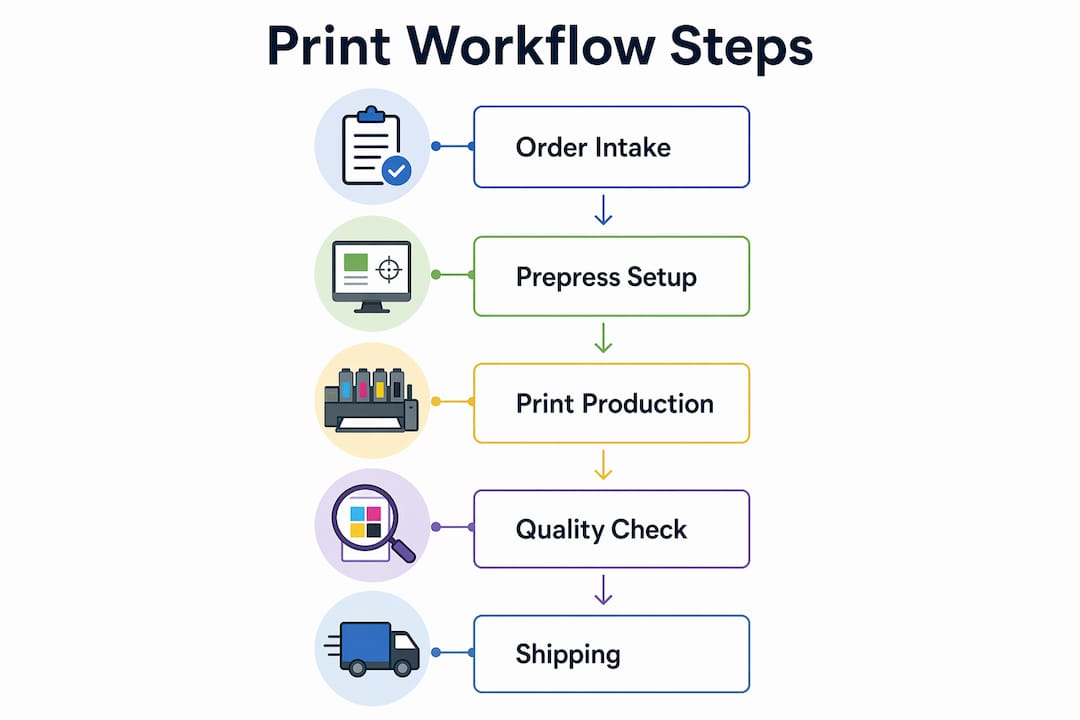
A small business printing workflow is the organized process that moves a print job from order intake to finished product, controlling quality and cost at every step. Without a defined process, small businesses lose time to manual errors, reprint costs, and inconsistent brand output. The industry term for this end-to-end system is print production management, and it covers everything from file preparation to delivery. Transferkingz has built its entire service model around this principle, offering Direct-to-Film (DTF) transfers that slot cleanly into a structured print production process for small businesses. Getting this process right is the single biggest lever you have for scaling custom merchandise without scaling your headaches.
What tools are essential for a small business printing workflow?
The right hardware and software form the foundation of any efficient printing solution. Without them, even the best process falls apart under volume.

Hardware: choosing the right printer for your output
High-capacity tank printers are the most cost-effective hardware choice for small businesses running regular print jobs. Epson EcoTank models, for example, yield up to 7,500 pages in black and up to 21,000 pages in color per refill. That translates to roughly two years of ink supply in a single fill, which cuts your consumable budget dramatically. For custom merchandise production, pairing a high-capacity printer with a DTF transfer setup gives you flexibility across fabric types without investing in separate equipment for each material.
Software: automation and web-to-print platforms
Print workflow automation uses logic-based rules to move jobs through production stages automatically, removing the need for manual follow-ups at each step. This increases visibility across your entire order queue and reduces the chance of a job getting stuck or lost. Web-to-print platforms take this further by connecting customer orders directly to your production system. Web-to-print solutions eliminate fragmented email coordination and enforce brand consistency through locked templates. For small businesses managing custom apparel orders, this combination of automation and web-to-print is the fastest path to reliable turnaround times.
Pro Tip: Link your web-to-print platform to your order management system from day one. Retrofitting integrations later costs far more time than setting them up correctly at the start.
Here is a quick reference for the core tools every small business print operation needs:
| Tool category | Primary function | Key benefit |
|---|---|---|
| High-capacity tank printer | Volume printing with low refill frequency | Reduces consumable costs significantly |
| Print workflow automation software | Logic-based job routing through production stages | Eliminates manual follow-ups and errors |
| Web-to-print platform | Customer order intake connected to production | Enforces brand consistency and speeds processing |
| Order management integration | Links storefront (e.g., Shopify) to accounting | Reduces manual data entry and billing errors |
| Print analytics tool | Tracks device usage and consumable waste | Identifies underused equipment and cost leaks |
How can small businesses reduce waste and boost print productivity?
Waste in print production comes from two sources: physical waste (paper, ink, misprints) and time waste (manual steps, reprints, scheduling gaps). Fixing both requires a deliberate production process, not just better equipment.
Short-run printing and batch planning
Short-run printing, defined as runs of 25–5,000 pieces, gives small businesses the flexibility to update designs frequently without sitting on large unsold inventory. Ordering a 3–6 month supply of stationery or branded merchandise at a time balances unit cost against storage and obsolescence risk. This batch size is the sweet spot for most small custom merchandise operations. Going larger locks up cash and risks waste if your design changes.
Production scheduling and error recovery
Structured production scheduling reduces stress and improves turnaround times by removing guesswork from daily operations. Assign each job a time slot, a responsible team member, and a defined output standard before it enters the queue. Audit trails and rollback plans are equally critical. When a print job jams or fails mid-run, a rollback plan lets you reprint only the affected items rather than the entire batch. That single practice can save hours of labor and hundreds of dollars in wasted materials.
Key tactics for reducing print waste and improving productivity:
- Set duplex printing and black-and-white as defaults for internal documents to cut paper and ink use immediately.
- Use print analytics to identify underused devices and consolidate jobs onto fewer, more efficient machines.
- Schedule production in batches rather than processing each order individually as it arrives.
- Keep a reprint log to track which jobs fail most often and address the root cause rather than just reprinting.
- Review consumable usage monthly and adjust reorder points based on actual data, not estimates.
Pro Tip: Print cost reduction comes from smarter policies and better visibility, not from buying cheaper ink. Analytics tools show you exactly where waste is happening so you fix the right problem.
How do you automate and manage print orders and inventory?
Order management is where most small print businesses lose the most time. Manual entry, status update emails, and disconnected inventory records create errors that compound quickly at volume.
Connecting your storefront to production
Automating order intake through a platform that links your storefront to accounting software saves over 10 hours per week and reduces manual errors across billing and fulfillment. For businesses running Shopify storefronts, connecting directly to a print production queue means orders flow in, get assigned, and move through production without anyone touching a spreadsheet. That time savings compounds every week. Redirecting those hours toward customer acquisition or product development is a direct business advantage.
Variable data printing and data hygiene
Variable data printing (VDP) is a method that personalizes each printed piece with unique text, names, or images drawn from a data file. It is powerful for custom merchandise, but only when your data is clean. Deduplicated and verified data is the non-negotiable foundation of any VDP job. Bad data produces wasted prints, extra costs, and damaged customer relationships. Run address verification and list deduplication before every VDP job, not after problems appear.
Steps to implement effective print order automation:
- Audit your current order intake process and identify every manual step.
- Select a web-to-print or order management platform that integrates with your existing storefront.
- Map your production stages and define the rules that move jobs between them automatically.
- Set up inventory alerts tied to actual consumption data from your print analytics tool.
- Build a rollback procedure for failed jobs and document it so any team member can execute it.
- Test the full workflow with a small batch before going live at full volume.
Pro Tip: Never skip the data hygiene step before a variable data print run. One bad address file can waste an entire batch and cost you a client.
What printing methods work best for small business custom merchandise?
The printing method you choose shapes your entire workflow. Setup time, minimum order size, cost per unit, and substrate flexibility all vary significantly across methods.
Traditional vs. digital printing methods
Offset printing delivers the lowest cost per unit at high volumes but requires expensive plate setup and long lead times. Screen printing suits bulk runs of simple designs on fabric but becomes costly and slow when designs change frequently. Digital printing methods, including Direct-to-Film (DTF) transfers, remove the setup cost entirely and allow full-color, photo-quality output on virtually any textile. DTF printing for small businesses offers no minimum order requirements, fast turnaround, and the ability to switch designs between jobs without any additional cost.
Comparing methods by workflow impact
| Printing method | Setup cost | Minimum run | Design flexibility | Best use case |
|---|---|---|---|---|
| Offset printing | High | High volume | Low | Stationery, catalogs |
| Screen printing | Medium | Medium run | Low | Bulk apparel, uniforms |
| Direct-to-Film (DTF) | None | No minimum | High | Custom merchandise, small runs |
| Direct-to-Garment (DTG) | Medium | No minimum | High | On-demand single garments |
| Sublimation | Low | No minimum | Medium | Polyester fabrics, hard goods |
DTF transfers fit the small business model better than most alternatives because they require no inventory of pre-printed stock. You print what you sell, when you sell it. Transferkingz provides gang sheet builders that let you pack multiple designs onto a single transfer sheet, cutting material cost per design significantly.
Pro Tip: Use a gang sheet for every DTF order that includes more than one design. Packing designs tightly onto a single sheet is the fastest way to lower your cost per transfer without sacrificing quality.
Key Takeaways
A well-built print production management system, combining automation, the right printing method, and clean data, is the most direct path to consistent quality and lower costs for small business custom merchandise.
| Point | Details |
|---|---|
| Automate order intake first | Connecting your storefront to production saves over 10 hours weekly and cuts manual errors. |
| Match print method to run size | DTF transfers require no setup cost or minimum order, making them ideal for small custom runs. |
| Use analytics, not guesswork | Print analytics identify waste and underused devices so you fix real problems, not symptoms. |
| Clean data before every VDP job | Deduplicated, verified data prevents wasted prints and protects your brand reputation. |
| Build rollback procedures | An audit trail and reprint plan for failed jobs prevents full-batch reprints and saves materials. |
Why most small print operations stay stuck at the same bottleneck
I have watched a lot of small print businesses invest in better equipment and still struggle with the same problems six months later. The equipment was never the issue. The process was.
The most common mistake is treating each order as a one-off event instead of a repeatable system. When every job gets handled differently, errors accumulate and turnaround times become unpredictable. The fix is not complicated. It is documentation and automation applied to the steps you already take manually.
The second mistake is skipping analytics. Most small business owners assume they know where their costs are going. Print analytics consistently reveal a different picture. Devices running at low utilization, color jobs that could be black-and-white, and reprint rates that nobody tracked are the real cost drivers. You cannot fix what you cannot see.
The third mistake is choosing a printing method based on what is familiar rather than what fits the workflow. Screen printing feels safe because it has been around for decades. But for a small business doing custom merchandise in short runs, it creates setup costs and minimum order constraints that work against you. DTF transfers remove those constraints entirely. The must-have tools for custom print entrepreneurs are not always the most expensive ones. They are the ones that fit your actual production model.
Build the process first. Then choose the tools that serve it.
— Anthony
How Transferkingz fits into your print production setup
Small businesses building a custom merchandise operation need a print partner that works with their workflow, not against it.

Transferkingz specializes in high-quality custom DTF transfers with no minimum order requirements, fast turnaround times, and a gang sheet builder that reduces material cost per design. You upload your artwork, configure your sheet, and receive production-ready transfers that apply cleanly to virtually any textile. For businesses running Shopify or similar storefronts, Transferkingz integrates naturally into an automated order-to-production workflow. The 2026 workflow optimization checklist on the Transferkingz blog walks through exactly how to connect these pieces into a repeatable system.
FAQ
What is a small business printing workflow?
A small business printing workflow is the defined process that moves a print job from order intake through production to delivery. It includes order management, file preparation, print scheduling, quality checks, and fulfillment.
How does print workflow automation save time?
Automation routes print jobs through production stages using logic-based rules, removing manual follow-ups and reducing errors. Businesses that automate order intake report saving over 10 hours per week on manual tasks.
What is the best printing method for small custom merchandise runs?
Direct-to-Film (DTF) transfers are the best fit for small custom runs because they require no setup cost, no minimum order, and support full-color designs on virtually any textile.
Why does data hygiene matter for variable data printing?
Bad data in a variable data print job produces wasted prints, incorrect personalization, and customer dissatisfaction. Running address verification and list deduplication before every job prevents these errors.
How do I reduce printing costs without buying cheaper supplies?
Print analytics tools identify underused devices and wasteful print behaviors. Setting duplex printing and black-and-white defaults for internal documents cuts consumable use faster than switching to lower-cost ink.
0 comments