

Expect UV DTF consumable costs of roughly $0.50–$3.00 per transfer once ink, film, and labor are counted, with startup printer budgets ranging from a few thousand dollars for an entry-level desktop unit to tens of thousands for an industrial system. Moderate-volume shops typically recoup that equipment cost in three to nine months. If you’re not ready for that capital outlay, Transfer Kingz fills the gap as an on-demand outsourcing option with no minimum order.
TL;DR:
- UV DTF consumable costs generally range from $0.50 to $3.00 per transfer, depending on product complexity and coverage levels.
- Equipment costs vary from about $2,700 for entry-level desktop printers to over $25,000 for industrial systems, with ownership becoming cost-effective at higher, predictable volumes.
- Per-print costs are influenced mainly by ink, film, labor, and spoilage, with larger printers achieving slightly lower costs due to bulk material discounts.
- Shops printing fewer than 50 transfers weekly benefit from outsourcing, while consistent high-volume operations can see break-even in three to nine months.
- Small workflow adjustments, like gang sheet batching and matching roll width to product size, can significantly reduce production costs without sacrificing quality.
Table of Contents
- How Much Does a UV DTF Transfer Cost at Each Shop Size?
- What Drives the Cost of Consumables Per Print?
- What Does It Cost to Buy UV DTF Equipment?
- How Do You Calculate the True Cost Per Transfer?
- How Should You Price UV DTF Transfers?
- When Does Buying a UV DTF Printer Pay for Itself?
- What Are the Best Ways to Cut UV DTF Production Costs?
- Why Trust Transfer Kingz’s Numbers on UV DTF Costs?
- Try Transfer Kingz Print Point Before You Buy Equipment
- A Quick Budgeting Note Before You Commit
- Sources
How Much Does a UV DTF Transfer Cost at Each Shop Size?
The right number depends entirely on how many prints you’re running per week, not just what the machine costs upfront. A shop printing 20 crystal labels a day has a completely different cost structure than one churning out 300 tumbler wraps, even on the same printer.
Here’s how the tiers break down in practice:
| Equipment tier | Price range | Typical daily throughput | Per-print consumable range |
|---|---|---|---|
| Entry-level (A3 desktop, single head) | moderate price range typical for small shops | 30 prints | $0.50–$1.20 |
| Mid-range (dual head, wider format) | moderate price range for growing businesses | 100–300 prints | $0.50–$1.00 |
| Industrial (multi-head, production line) | higher price range for volume production | 400+ prints | $0.50–$0.80 |
These figures come from current UV DTF printer price benchmarking, which puts per-print production costs in the $0.50–$3.00 band depending on product type and ink coverage. A small logo sticker sits at the low end; a heavily saturated, oversized crystal label with metallic film pushes toward the top.
Notice the pattern: bigger machines don’t just print faster, they also lower your per-unit consumable cost slightly because you’re buying ink and film in bulk and spreading fixed overhead across more units. That’s the whole logic behind equipment tiers, and it’s why a shop stuck at 30 prints a day on an industrial machine is actually burning money on underused capacity.
If you’re doing under 50 prints a week, or your customers order wildly different products (stickers one week, glass etching decals the next), outsourcing to a transfer supplier is almost always cheaper than owning a machine. You avoid depreciation, maintenance, and the ink/film inventory sitting on a shelf between orders. Ownership starts winning once you have predictable, repeatable daily volume, which is the same conclusion Castle Ink’s cost breakdown draws when comparing owned equipment against buying finished transfers.
What Drives the Cost of Consumables Per Print?
Four line items make up nearly all of your per-print cost: ink, film, labor, and spoilage. Get these numbers right and you can price confidently instead of guessing.
UV ink. Commercial-grade UV ink runs $60–$200 per liter depending on brand and pigment formulation, and a liter typically covers 10–15 square meters at standard coverage density, according to industry pricing data. Do the math on the low end: $60 ÷ 12 square meters works out to about $0.005 per square inch of ink alone. On a 4-inch by 4-inch crystal label (16 square inches), that’s roughly $0.08 in ink, before film.
AB transfer film. UV DTF requires two film layers, the “A” film that carries the print and the “B” adhesive film that transfers it to the surface, and that two-film requirement is exactly why UV DTF stickers cost more per unit than a single-layer product. Bulk roll pricing for AB film generally lands in the $0.10–$0.60 per square meter range, based on figures from current setup-cost guides, though wider rolls and better suppliers push the per-unit cost down as volume rises.
Put ink and film together, and small-shop math from side-business cost breakdowns consistently lands around $0.04–$0.08 per square inch for combined film and ink at typical coverage. That’s your baseline multiplier for almost any size calculation.
Varnish and laminate. Some UV DTF products, especially outdoor decals and glass applications, add a protective varnish or laminate pass. This second coating step adds material cost and machine time, which is another reason two-step or two-film workflows always price higher than a single-pass sticker.
Labor and spoilage. A single operator running a UV DTF printer typically allocates around $0.50 per item in labor for weeding, applying, and packing, per operational cost guidance from equipment suppliers. Skip this and your actual cost per finished item will run higher than your spreadsheet says every single time.
Here’s what a mid-size crystal label (4 inches by 4 inches, 16 square inches) looks like when you stack these:
- Ink and film at $0.06/sq. in.: $0.96
- Labor allocation: $0.50
- Spoilage buffer (12%): $0.18
- Total consumable + labor cost: roughly $1.64
Pro Tip: Track spoilage separately from your base material cost for at least a month. Shops that lump it into “ink cost” almost always underprice their transfers, because a bad batch of 15 misprints on a Tuesday quietly eats the margin you thought you had.
What Does It Cost to Buy UV DTF Equipment?
The printer itself is only part of the startup number. What separates a smooth launch from a stressful one is knowing every line item before you sign a purchase order, not discovering them after.
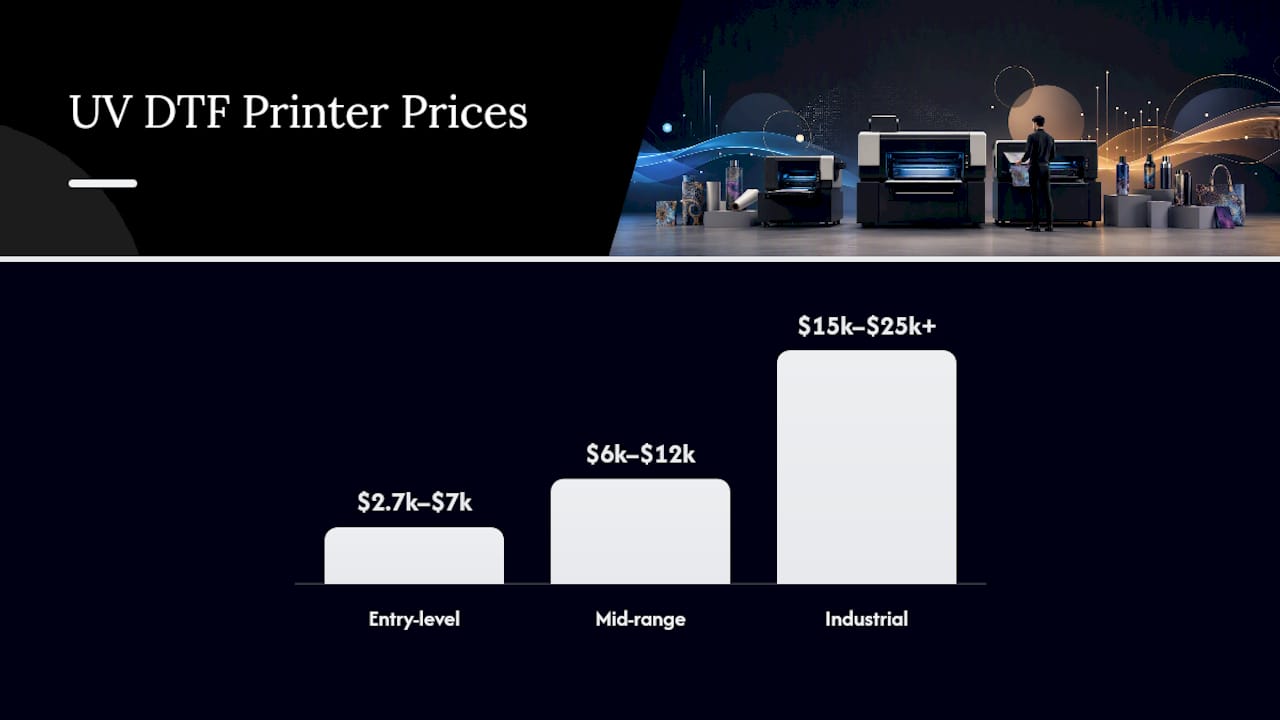
**Entry-level machines are usually A3-format desktop units with a single printhead, priced at a moderate range suitable for testing the market or running a side business, with throughput typically up to several dozen prints a day depending on design complexity. A realistic starter package, printer plus minimal consumables, can run as low as $2,700–$7,000 total according to small-shop startup estimates, which is useful if you’re bootstrapping.
Mid-range machines ($6,000–$12,000) add wider print widths, sometimes dual printheads, and noticeably better uptime under daily production loads.
Industrial systems ($15,000–$25,000+) run multi-head configurations built for continuous production, the kind of machine that makes sense once you’re consistently pushing 300+ prints a day.
Beyond the printer, budget for these accessories, which most first-time buyers underestimate:
- RIP software licensing (often $500–$2,000, sometimes bundled with the printer)
- A laminator if your workflow requires a separate lamination pass
- Precision cutters or plotters for die-cut sticker work
- Spare printheads and maintenance kits (printheads are the single most expensive replacement part on any UV printer)
- Shipping and crating, which varies significantly by machine weight and whether it ships internationally
- Customs duties if importing from overseas manufacturers, which can add 5–25% depending on your country’s tariff schedule
- Installation and operator training, sometimes included, sometimes a separate line item worth negotiating before purchase
Warranty terms vary widely between vendors. A one-year warranty is standard; extended coverage on the printhead assembly, the single costliest failure point, is worth the extra spend for any shop planning to run the machine daily.
For amortization purposes, most shops depreciate UV DTF equipment over a 3 to 5 year useful life. A $10,000 mid-range printer amortized over 4 years and 250 working days a year adds roughly $10 per day, or about $0.10–$0.30 per print at moderate volume, to your true per-unit cost. That number rarely shows up in a shop’s pricing until someone actually runs it, which is exactly why so many new operators underprice their first year of orders. For a closer look at how these numbers apply specifically to decal production, Transfer Kingz breaks down what UV DTF decals actually cost to buy versus produce in-house.
How Do You Calculate the True Cost Per Transfer?
A spreadsheet with six inputs will get you a defensible per-item cost for almost anything you print. Here are the inputs:
- Ink cost per liter, divided by square meters of coverage per liter
- Film cost per square inch (A film plus B film combined)
- Labor minutes per item, multiplied by your effective hourly labor rate
- Amortized equipment cost per unit (daily depreciation divided by daily print volume)
- Energy cost per print (usually negligible, a fraction of a cent, but worth including for industrial runs)
- Spoilage allowance, applied as a percentage markup on the subtotal
Walk through three real product types using this formula:
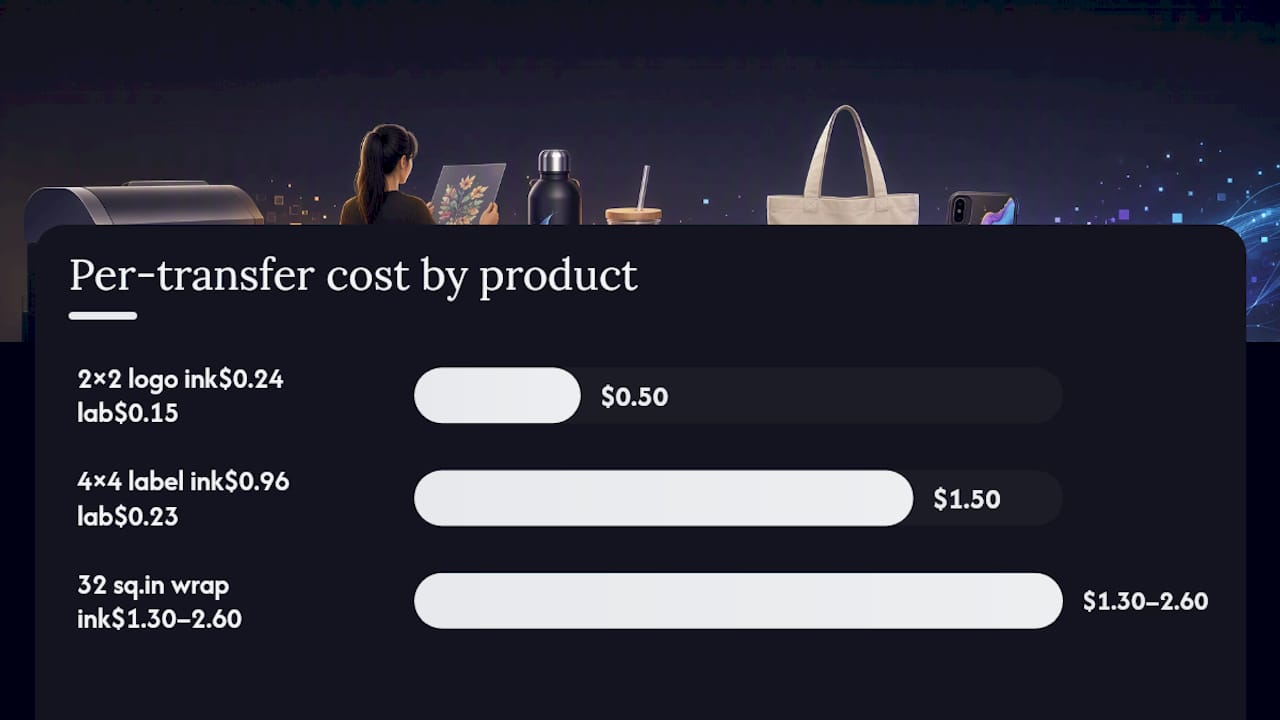
Example 1: Small logo sticker (2 inches by 2 inches, 4 sq. in.) Ink and film at $0.06/sq. in. = $0.24. Labor (30 seconds at $18/hour) = $0.15. Amortized equipment share is a small amount, with spoilage adding a moderate percentage. Total cost around fifty cents. At a markup, retail prices typically range in a few dollar region.
Example 2: 4x4 crystal label (16 sq. in.) Ink and film at $0.06/sq. in. = $0.96. Labor (45 seconds) = $0.23. Amortized equipment adds a small per-item cost, with spoilage allowance included. Total cost about one and a half dollars. Wholesale and retail markups multiply this accordingly.
Example 3: Tumbler wrap (32 sq. in., using the wrap math from industry estimates) Film and ink at $0.04–$0.08/sq. in. runs $1.30–$2.60 before labor, per side-business margin breakdowns.
The single biggest lever in this formula is ink coverage. A design with heavy full-bleed color can double your ink cost per square inch compared to a sparse logo with lots of white space, since UV ink is priced and consumed by volume, not by design complexity. Film width matters almost as much: buying narrower rolls than your design needs wastes material on every single print, which is a mistake worth catching before your first bulk order. For a deeper walkthrough of this exact math applied to real order volumes, see how Transfer Kingz calculates DTF cost per print for U.S. shops.
How Should You Price UV DTF Transfers?
Cost-plus pricing is the simplest defensible method: take your true per-item cost (materials, labor, amortized equipment, spoilage) and multiply it. Wholesale customers typically get a 3x–5x multiplier; retail customers usually see 5x–8x, particularly on specialty products like crystal labels or holographic finishes, a range consistent with commercial pricing guidance for the category.
A few rules worth adopting immediately:
- Set a minimum order value (commonly $15–$25) to cover the fixed labor of setup, weeding, and packing on small orders, regardless of unit count.
- Charge a rush premium of 20–35% for same-day or next-day turnaround, framed to customers as covering the cost of reordering your production queue, not as a penalty.
- Price specialty films (holographic, metallic, glow-in-the-dark) at the higher end of your markup range. They add only modest consumable cost but customers consistently pay more for the visual effect, which specialty film economics backs up as one of the highest-ROI upsells available.
- Offer quantity discounts starting around 100+ units, where your per-unit ink and film cost drops due to gang-sheet efficiency, and pass a portion of that savings to the customer to win repeat bulk orders.
Pro Tip: Never quote a rush fee as a flat dollar add-on for every order size. Quote it as a percentage of the order total instead, so a $30 rush job and a $600 rush job both feel proportionate to the customer instead of one feeling gouged.
When Does Buying a UV DTF Printer Pay for Itself?
The breakeven formula is straightforward: divide your total equipment investment by your profit margin per print, then divide that by your daily print volume to get days to payback.
Take a $6,000 mid-range printer with an average profit margin of $1.20 per print (after subtracting the roughly $0.50–$1.00 in materials and labor from a $2.00 average selling price). At 30 prints a day, that’s $36 in daily profit, putting payback at around 167 days, roughly five and a half months. Push volume to 100 prints a day and daily profit jumps to $120, cutting payback to 50 days, under two months.
This is the practical case for scaling: throughput doesn’t just increase revenue, it compresses your equipment payback window dramatically. The catch is capacity. A single operator can usually only weed, apply, and pack so many prints per shift before quality slips or overtime costs erase the margin gain. Once you’re consistently maxing out one operator’s daily output, the next dollar of ROI comes from adding labor or a second machine, not from squeezing more speed out of the one you have.
Most shops running moderate volume (75–150 prints daily) see realistic payback windows of three to nine months on mid-range equipment, a range consistent with the printer price tiers reported in current UV DTF cost data. Below that volume, the math stretches out fast, and outsourcing starts looking a lot more attractive than a slow-payback machine sitting idle half the week.
What Are the Best Ways to Cut UV DTF Production Costs?
Small workflow changes save more money than most shops expect, often without touching quality at all.
- Design gang sheets to fill roll width edge to edge; every inch of unused film on a 22 inch roll is pure waste with zero offsetting revenue.
- Match roll width to your most common product size rather than buying one width for everything, since oversized rolls for small stickers waste material on every print.
- Buy ink and film in quantities you’ll use within their shelf life, generally 6–12 months for opened ink, rather than chasing bulk discounts that leave stock expiring on a shelf.
- Never cut corners on printheads or manufacturer-approved ink. Off-brand ink can clog heads or void warranties, and a $400 printhead replacement erases months of savings from a cheaper ink supplier.
- Do cut corners, carefully, on laminate thickness for indoor-only products where UV exposure and abrasion resistance matter less.
One workflow tweak worth adopting immediately: batch similar-sized orders into a single gang sheet run instead of printing each customer order separately. It cuts machine setup time per item and reduces the film trim waste that accumulates from printing odd-sized single jobs all day. Transfer Kingz’s own step-by-step UV DTF workflow guide walks through exactly where in the process this batching saves the most time.
Pro Tip: *Keep a running “waste log” for one full week, tracking every misprint, trimmed scrap, and expired ink cartridge by dollar value.
Why Trust Transfer Kingz’s Numbers on UV DTF Costs?
Transfer Kingz operates as a working UV DTF and DTF transfer supplier, not just a source of theoretical pricing guides, which means the cost breakdowns above reflect what actually happens on a production floor: ink usage, film waste, spoilage rates, and labor minutes per item. The site runs with no minimum order requirements and a gang-sheet builder that lets shops size and combine designs to minimize film waste before they ever commit to a purchase.
This article’s analysis was compiled by Anthony, a regular contributor to the Transfer Kingz blog covering DTF and UV DTF production economics; additional case studies and background are available on request.
If your shop prints under 100 units a day, or your product mix changes too often to justify dedicated equipment, outsourcing to a supplier like Transfer Kingz often beats ownership on total cost once you factor in depreciation, spoilage, and idle machine time. If you’re consistently running 150+ prints daily with a stable product line, ownership starts to make more financial sense, and the ROI math in the previous section will tell you exactly when that crossover happens for your specific volume.
Try Transfer Kingz Print Point Before You Buy Equipment
If the $3,000–$25,000 equipment range above gave you pause, you don’t have to commit to it just to find out whether UV DTF sells for your products. Print Point lets you order finished UV DTF transfers on demand, at any quantity, so you can test designs and materials against real customer demand before spending a dollar on a printer, RIP software, or a laminator.
No minimum order requirements mean you can run a single crystal label or a full gang sheet without committing to a bulk print run. The online gang-sheet builder lets you size and combine multiple designs into one sheet the same way an in-house shop would, cutting your effective per-unit cost without owning any hardware. Turnaround stays fast enough to fill customer orders on a normal production schedule instead of a testing timeline. If you’re still deciding between buying a machine and outsourcing, start by placing a small trial order through Print Point and comparing the delivered cost per unit against the equipment math in this guide.
A Quick Budgeting Note Before You Commit
The hidden cost that trips up most new shops isn’t the printer, it’s underestimating spoilage until a bad ink batch or a run of misaligned film eats a week of margin. Before ordering bulk ink or film, buy small rolls and sample quantities first, run test prints on your actual substrates, and check color accuracy and adhesion under real wear conditions. It’s a cheap insurance policy against a very expensive mistake.
— Anthony
Sources
The per-print and equipment figures in this guide draw on a handful of current industry sources worth bookmarking if you want to run your own numbers. Fujia Printer’s 2025 cost breakdown covers printer price tiers and per-print production cost ranges in detail. SHL Supply’s side-business breakdown offers realistic starter-budget estimates and per-square-inch math for small operations. Textek’s 2026 setup and margin guide covers film pricing and markup recommendations across wholesale and retail. Castle Ink’s equipment breakdown explains the ownership-versus-outsourcing threshold in plain terms. Cross-checking two or three of these against your own supplier quotes will tell you fast whether the ranges here apply to your market.
- UV DTF Printer Price: 2025 Cost Breakdown
- Starting a UV DTF Side Business: Equipment, Materials & Real Margin Break
- How to Start a UV DTF Printing Business in 2026: Setup Costs, Profit Margins, and the 5 Most Profitable Niches
0 comments