

TL;DR:
- Having a solid workflow with automated tools ensures consistent, error-free bulk DTF printing that saves time and materials.
- Implementing preflight checks, JDF job tickets, hotfolders, and parameter propagation streamlines production, reduces mistakes, and scales output efficiently.
Running a bulk Direct-to-Film (DTF) print operation without a solid workflow for bulk print orders is like trying to fill 200 orders from a single sticky note. Files get lost, colors shift between batches, and a single misaligned design can mean reprinting hundreds of transfers. For small business owners and independent designers, the cost is real — in time, materials, and client trust. This guide walks you through every essential stage of an efficient bulk printing process, from file preparation to production scaling, so you can deliver faster, tighter, and with far fewer headaches.
Table of Contents
- Understanding prerequisites and workflow essentials
- Step-by-step workflow for bulk DTF print orders
- Common pitfalls and troubleshooting tips for bulk DTF print workflows
- Measuring success and scaling your bulk DTF print operations
- Why mastering an automated bulk DTF print workflow sets your business apart
- Streamline your bulk DTF print orders with Transfer Kingz
- Frequently asked questions
Key Takeaways
| Point | Details |
|---|---|
| Automate with standards | Use JDF job tickets and hotfolders to reduce manual errors and speed bulk order processing. |
| Standardize file prep | Consistent bleed, color management, and batch parameters ensure scalability and quality. |
| Preflight early | Catch file errors before printing to avoid costly delays and reprints. |
| Batch processing saves time | Apply settings across multiple files to enhance throughput without pixel-level edits. |
| Measure and grow | Track metrics like turnaround time and defect rates to improve and scale operations efficiently. |
Understanding prerequisites and workflow essentials
Having identified common challenges, let’s lay out the key prerequisites and core concepts vital for a smooth bulk DTF printing workflow.
Before you print a single sheet, your foundation has to be right. A great DTF print workflow starts with three non-negotiables: high-resolution artwork, standardized file formats, and equipment that can actually talk to your automation tools.
Here is what you need locked in before scaling:
- Artwork resolution: Minimum 300 DPI at print size. Lower resolution creates pixelation that is painfully obvious on fabric, especially in fine detail and text.
- Color profiles: Work in CMYK with embedded ICC profiles. RGB files converted at the last minute produce unpredictable color shifts across a batch.
- File format: High-resolution PDFs with embedded fonts and flattened layers are the safest choice for bulk jobs. PNG files with transparent backgrounds work well for individual transfer files.
- Bleed and margins: Add at least 2 mm of bleed around every design. Missing bleed is the single most common reason files get kicked back during preflight.
- White underbase layer: DTF requires a white ink layer beneath the color. Make sure your artwork files are set up to generate one, or your RIP software will handle it automatically if configured correctly.
On the equipment side, look for DTF printers that support hotfolder integration. A hotfolder is a monitored folder on your network where files dropped in are automatically picked up, processed, and sent to the printer without any manual clicking. This is not a luxury at scale. Job specifications as machine-readable instructions reduce errors and speed production by delivering consistent validated data to your RIP and operators.
Pairing hotfolders with JDF job tickets (Job Definition Format, an XML-based standard that carries all production parameters alongside the file) means your printer, RIP, and finishing equipment all receive the same instructions without manual re-entry at each stage.
| Workflow element | Specification | Why it matters |
|---|---|---|
| Artwork resolution | 300 DPI minimum | Prevents pixelation and poor edge detail |
| Color profile | CMYK with embedded ICC | Ensures color accuracy across the batch |
| File format | PDF (print-ready) or PNG | Reduces compatibility errors |
| Bleed | 2 mm minimum | Prevents white edges on finished transfers |
| Automation tool | Hotfolder plus JDF | Removes manual file handling bottlenecks |
| White underbase | Required layer in file or RIP | Ensures vibrant color on dark garments |
Pro Tip: Run a test batch of five files through your full workflow before committing to a large order. Catching a misconfigured color profile on five files is a quick fix. Catching it on 500 is an expensive problem.
Step-by-step workflow for bulk DTF print orders
With prerequisites clear, let’s walk through the detailed steps of executing a bulk DTF print order using best automation practices.
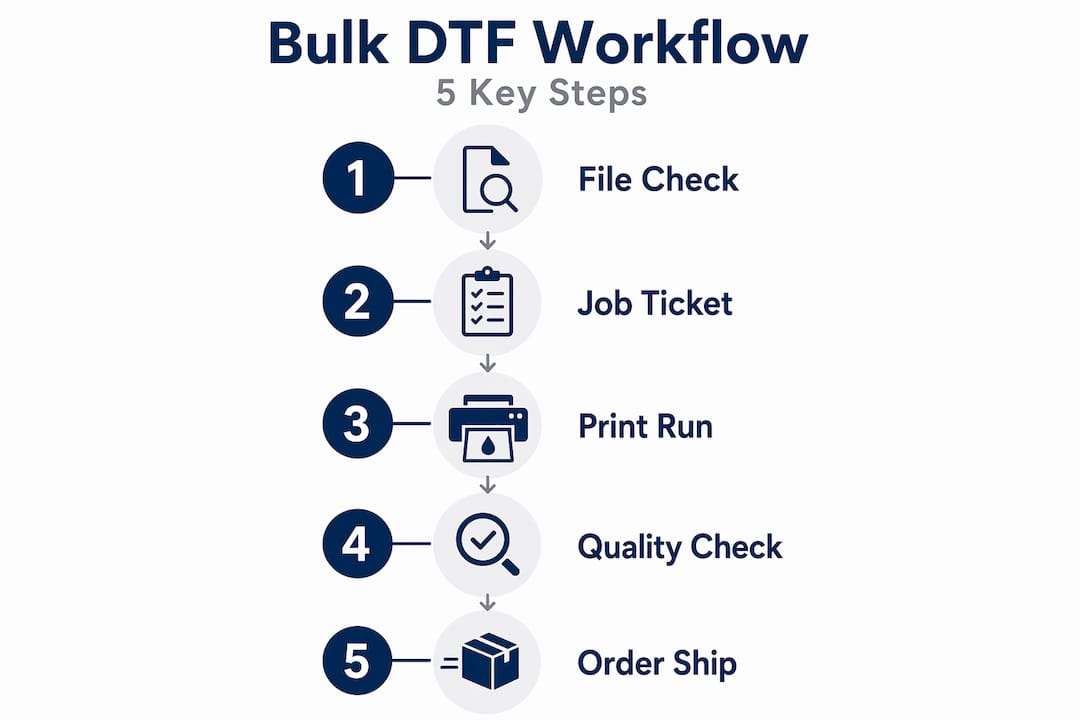
A repeatable, numbered process is what separates a production shop from a chaotic pile of orders. Here is how an efficient print order system should run for bulk DTF jobs:
- Receive and organize files. Set up a client intake folder structure organized by order number, not client name. This keeps batches clean and makes retrieval instant.
- Run automated preflight checks. Use your RIP or a preflight tool to verify resolution, fonts, color space, bleed, and trim boxes on every file automatically. Hot-folder preflight automation checks, corrects, and routes files without manual intervention, cutting intake time dramatically.
- Generate JDF job tickets. Once files clear preflight, the system generates a job ticket that carries all production parameters, including ink limits, print size, media type, and finishing settings. Industry-standard JDF/XML job tickets define production from order entry through prepress all the way to postpress delivery.
- Drop files into device-specific hotfolders. Each printer or output device gets its own hotfolder configured with the correct settings. Files go in, finished output comes out. No manual copying, no forgotten settings.
- Proof and get client approval. For first-time designs or new clients, route a digital proof before printing the full run. Integrate this step early, not after printing, to avoid reprints on large batches. Efficient workflow techniques for custom orders consistently show that early approval gates save production time overall.
- Apply batch parameters via parameter propagation. Instead of manually adjusting settings file by file, parameter propagation pushes the same production settings across the entire batch simultaneously. For a 200-piece order, this alone can cut setup time by 80%.
- Print, powder, and cure. Run the batch through your DTF printer, apply hot-melt adhesive powder evenly, and cure in your oven at the correct temperature and dwell time. Consistency here is everything for adhesion quality.
- Quality check before packaging. Pull random samples from the batch and check for color accuracy, transfer adhesion, edge quality, and any visible defects before packaging.
| Stage | Manual workflow | Automated workflow |
|---|---|---|
| File intake | Manual review per file | Automated preflight on upload |
| Job setup | Re-enter settings per job | JDF ticket auto-generates |
| File routing | Manual copy to printer folder | Hotfolder auto-routes files |
| Batch parameters | Set individually per file | Propagated across entire batch |
| Error detection | Caught during or after printing | Caught before production starts |
| Turnaround time | Longer due to manual steps | Significantly shorter |
Pro Tip: Use a consistent file naming convention such as OrderNumber_ClientName_DesignID_Date for every batch. When something goes wrong at 2 a.m. before a deadline, this naming system means you find the file in seconds instead of minutes.
Common pitfalls and troubleshooting tips for bulk DTF print workflows
Understanding the workflow helps avoid mistakes, but this section focuses on common problems you might face and how to resolve them quickly.
Even with a solid setup, bulk jobs surface specific failure points. Knowing them in advance means you fix them before they become expensive.
The most common issues in bulk DTF workflows:
- Color shifting across the batch: Usually caused by inconsistent ICC profiles or a RIP that was not calibrated recently. Fix this by running a calibration print at the start of each production day.
- Misalignment on repeat prints: Often traced back to inconsistent media loading or worn feed rollers. Check media tension and run a test print after any media change.
- Insufficient bleed causing white edges: File preparation issue. Your preflight check should catch this before the file ever reaches the printer.
- Powder adhesion failures: Typically from uneven powder application or incorrect curing temperatures. Use a digital thermometer in your curing oven to verify consistency.
- Print head clogs: The most common hardware issue in DTF production. Run a nozzle check before every large batch and keep a cleaning routine scheduled daily.
“Errors caught early during preflight cost almost nothing to fix compared to errors detected on press, which can be very costly.”
Color management and standardized file preparation during the artwork stage enable consistent transfer quality and minimize rework. Getting this right at the front end is always cheaper than fixing it in the middle of a production run.
The best ongoing tool for any bulk DTF operation is a QA log. Every time an issue occurs, document it: what the problem was, what caused it, and how it was fixed. Over time, this log becomes your most valuable troubleshooting resource, especially when training new operators.

For DTF printing cost-saving tips that go deeper into protecting your margins on bulk jobs, those resources are worth keeping in your back pocket.
Pro Tip: Maintain a QA log in a shared document your entire team can access and update. When an operator catches a recurring powder adhesion issue on a specific media type, that note saves the next person 30 minutes of troubleshooting.
Measuring success and scaling your bulk DTF print operations
Now that you know how to run and troubleshoot your workflow, let’s look at how to measure results and grow your bulk printing capacity effectively.
You cannot improve what you are not tracking. The best practices for bulk printing always include a measurement layer because gut feel does not scale.
Key performance indicators to track:
- Turnaround time per batch: From file receipt to production-ready transfers. Track this weekly to spot slowdowns.
- Defect rate: Number of rejected prints divided by total prints per batch. Even a 2% defect rate on a 1,000-piece order means 20 reprints.
- Cost per print: Total production cost divided by number of transfers. This tells you exactly where automation is (or is not) saving money.
- Customer satisfaction score: Collect it after every order. A workflow change that speeds production but increases returns is not an improvement.
- Equipment uptime: Track downtime caused by clogs, calibration, or maintenance. Unplanned downtime in a bulk job is expensive.
Automation shortens production cycles, enabling more jobs with the same staff and equipment while reducing turnaround times and improving customer satisfaction. Here is what that looks like in real numbers:
| Metric | Before workflow automation | After workflow automation |
|---|---|---|
| Average turnaround time | 7 to 10 business days | 3 to 5 business days |
| File error rate at intake | 15 to 20% | Under 3% |
| Setup time per batch | 45 to 60 minutes | 10 to 15 minutes |
| Reprint rate | 8 to 10% | Under 2% |
| Jobs processed per day | 8 to 10 | 18 to 25 |
Scaling does not mean buying more equipment before you have to. It means getting more output from what you already have through better bulk print order management and smarter scheduling. Boosting production speed is about process efficiency first, hardware investment second.
Pro Tip: Invest in operator training every quarter, not just when someone makes a mistake. A 30-minute refresher on equipment calibration and file prep standards pays off in fewer defects and faster throughput on every batch that follows.
Why mastering an automated bulk DTF print workflow sets your business apart
Here is the uncomfortable truth about bulk DTF production: most small shops are not losing to competitors with better equipment. They are losing to competitors with better processes.
Manual workflows create a ceiling. You add orders, you add hours, you add stress, and at some point the system breaks under its own weight. A missed bleed here, a wrong color profile there, and suddenly a high-volume client is placing their next order somewhere else. The reaction is always the same: “We just need to hire another person.” But that is the wrong answer when the bottleneck is process, not headcount.
Job specifications in machine-readable format traveling with the job ensure consistent validated data reaching operators and RIPs. This is what shifts a print operation from reactive to predictable. You stop chasing problems and start anticipating them.
Batching bulk DTF transfer files with parameter propagation scales processing of 50 or more assets without manual pixel edits, which is the core of scalable automation. When you can push production settings across an entire batch simultaneously, your capacity multiplies without your labor cost multiplying with it.
“The shops that grow aren’t always the ones with the newest printers. They’re the ones that decided their process was the product.”
The practical move is to start small. Pick one stage of your current workflow, automate it, and measure the result. Hotfolder intake is usually the fastest win because it removes the most repetitive manual step immediately. Once that runs cleanly, move to automated preflight. Then batch parameter propagation. Build confidence and ROI one stage at a time, and the whole system becomes something you can hand off and trust.
This is how a side hustle becomes a production business.
Streamline your bulk DTF print orders with Transfer Kingz
Ready to put these workflow principles into action? Transfer Kingz makes it straightforward to execute bulk DTF print orders with speed, accuracy, and quality you can depend on.

Whether you are producing 50 custom tees or 5,000 gang sheet transfers, Transfer Kingz handles the heavy lifting so your production stays on schedule. From streamlined file submission to fast proof turnaround, every step is built around keeping your operation moving.
What you get with Transfer Kingz:
- Fast proof turnaround on custom designs
- Dedicated quality control on every bulk order
- Competitive pricing with no order minimums
- Responsive support for custom DTF transfers in Dallas and across DTF transfers in Texas
- Consistent, print-ready output that works with your existing workflow
Stop rebuilding your process from scratch on every large order. Let the workflow work for you.
Frequently asked questions
What file formats are recommended for bulk DTF print orders?
Use high-resolution PDFs with embedded fonts and CMYK color profiles, including appropriate bleed and trim boxes to ensure print accuracy and reduce errors. Preflight checks verify resolution, fonts, color spaces, and bleed before production to catch costly issues early.
How can I reduce color inconsistency in bulk DTF printing?
Implement a documented color management workflow with calibrated monitors, ICC profiles, and proofing processes to keep colors consistent from screen to fabric. Effective DTF color management bridges screen design to finished product using calibrated devices and ICC profiles to minimize color shifts.
What is the typical turnaround time for bulk DTF print orders?
Bulk orders typically ship within 3 to 5 business days, with expedited and next-day options available depending on your needs and provider capabilities.
How does automation improve bulk print workflow efficiency?
Automation eliminates manual file handling by using machine-readable job tickets and hotfolder delivery, reducing errors and speeding production significantly. Job specifications in machine-readable format traveling with the job ensure consistent validated data, enabling faster and error-free production.
0 comments